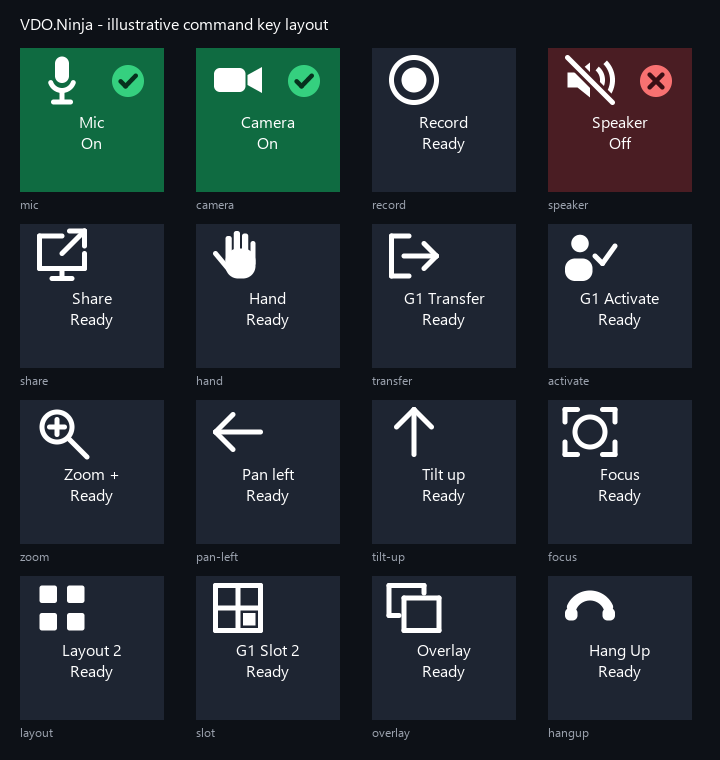
This is the native Stream Deck plugin implementation workspace. For everyday setup, start with the plain-language guide. For screenshots, the supported-action matrix, and install notes, see the repo README.
Current positioning: early native prototype/MVP. It is not yet a full replacement for the Bitfocus Companion VDO.Ninja module because presets, named connections, and broader dynamic feedback are still in progress.
Every action targets a VDO.Ninja page opened with &api=KEY.
| Action | Controller | What it does |
|---|---|---|
| Connection Status | Key | Connection and status feedback for the configured API key. |
| Local Control | Key | Mic, camera, speaker, record, screen share, hand, keyframe, reload, and hangup on the local page. Mic also supports push-to-talk and push-to-mute. |
| Select Guest | Key | Selects a fixed slot/stream, the next or previous guest, the first held guest, or clears the selection. |
| Guest Command | Key | Guest control targeted by slot, stream ID, selected guest, or first held guest. |
| Guest Scene | Key | Arbitrary scene ID/name toggles, fixed-scene force on/off, and scene membership feedback. |
| Guests List | Key | Displays connected guests or the members of one scene, with automatic text sizing and rotation for long lists. |
| Mixer Control | Key | Layout selection, guest slot assignment, all-guest mute, and a guarded all-guest transfer. |
| PTZ Key | Key | Local zoom/pan/tilt/focus/exposure and guest zoom/pan/tilt/focus/autofocus. |
| PTZ Dial | Stream Deck + | Local or guest zoom/pan/tilt/focus, local exposure, and guest autofocus press actions. |
| Value Dial | Stream Deck + | Local volume, panning, bitrate, buffer delay, and guest volume. |
| Custom Command | Key | Any { action, target, value, value2 } payload. |
Both dial actions support selected-target mode, inversion, optional acceleration, and rate-limited sends.
Beyond the actions themselves:
getDetails and getGuestList.{slot}, {label}, {streamID}, {command}, {scene}, and {state} tokens where relevant.npm install
npm run build
The build output is ninja.vdo.streamdeck.sdPlugin/.
Connection Status action in Stream Deck.Test connection.Local Control, Select Guest, Guest Command, Guest Scene, Guests List, Mixer Control, PTZ Key, PTZ Dial, Value Dial, or Custom Command actions.The manifest targets the Node 20 runtime bundled with Stream Deck 6.8+; newer local Node versions work for development.
Choose all guests (the default) or a scene ID/name. The list uses the existing API polling interval (5 seconds by default), plus live state updates. Directors, the local stream, and entries without a position in either getDetails or getGuestList are excluded.
The row template defaults to {slot} {label} and also supports {streamID}. In scene mode, the header defaults to Scene {scene} and also supports {count}. Both templates accept multiple lines and preserve multiline spacing. The font shrinks from 24px to 9px based on the number of display lines; long individual lines are truncated. Lists that still exceed the key height rotate every 3 seconds. Rotation stops when the key disappears.
npm test
npm run check
npm run build
npm run test:runtime
npx @elgato/cli@1.7.4 validate ninja.vdo.streamdeck.sdPlugin --no-update-check
npx @elgato/cli@1.7.4 pack ninja.vdo.streamdeck.sdPlugin --dry-run -f --no-update-check
pack refuses to run when a .streamDeckPlugin file from an earlier build is already there, so -f keeps the dry run repeatable.
These verify command payloads, TypeScript, generated plugin layout, manifest rules, package contents, and startup from an isolated copy with no development node_modules available. Tests cover every exposed command choice, property-inspector buttons and registry alignment, manifest image wiring, custom value parsing, transport behavior, and state normalization. Interactive button/dial testing still requires the Stream Deck app with either hardware or Stream Deck Mobile.
All artwork is generated from one spec by npm run assets, so the vector and raster forms cannot drift apart:
scripts/icon-set.mjs holds the palette and the shape list for every icon.scripts/generate-icons.mjs renders each spec to imgs/actions/*.svg (action list), imgs/*.svg (vector source), and anti-aliased imgs/*.png plus native @2x files (keys, encoders, marketplace tile).Edit the spec, not the output. Keypad state images keep their glyph in a corner badge so the two-line title the plugin draws stays legible. src/manifest-assets.test.ts fails the build if the manifest references an image that does not exist, if a raster image is the wrong size, or if a generated image is never referenced.
Local and guest commands now select their own microphone, camera, record, speaker, share, transfer, activation, and other glyphs from the command registry. PTZ keys distinguish zoom, pan, tilt, focus, and exposure; mixer keys distinguish layout, slot, mute, and transfer. The symbol sits above the title alongside a separate state badge. Commands without an observed on/off state use neutral artwork. Stream Deck continues to honor user-supplied custom images.
Inspector edits refresh key titles and artwork immediately, including while disconnected. Test connection requires a fresh page response. Momentary mic commands preserve press/release order and release when the key disappears or its behavior changes.
See the illustrative icon preview. It demonstrates title spacing and artwork, rather than reproducing live state from Stream Deck.
getDetails callbacks without a target are treated as full snapshots; details updates are treated as partial updates and merged.getDetails is also polled through the documented HTTP API route, using the configured interval as a backstop for DOM-derived state.getGuestList is treated as a director UI ordering helper, not as the universal stream list.Guest Scene action and raw/custom commands.addScene toggle, and alerts when that state is unavailable.layout=0 is auto, layout=1 is the first configured layout, and setslot uses user-facing destination slot numbers where 1 is mixer slot 1 and 0 unsets the assignment. Layout object fields such as slot: 0 keep VDO.Ninja’s existing zero-based layout-item convention.&slotmode=1 or use /mixer?director=ROOM&api=KEY; current VDO.Ninja reports the local page’s slotmode flag in getDetails, and the inspector shows a setup hint when it is off.mic command, excluding directors and screen-share pseudo-guests. This keeps the action usable with pre-v30.1 pages instead of depending on the newer muteAllGuests wrapper.forward commands one guest at a time and requires a second press by default.zoom/pan/tilt/focus/exposure, guest ptzZoom/ptzPan/ptzTilt/ptzFocus/ptzAutofocus. Guest exposure and local autofocus are intentionally blocked.&ptz and approve browser PTZ permission. Guest PTZ requires the guest publisher to load with &ptz; director/mixer pages can then send guest ptz* commands. Current VDO.Ninja reports the local page’s ptz flag in getDetails.volume, panning, bitrate, setBufferDelay, and guest volume. Buffer delay uses value2: "*" for all current inbound streams and omits value2 for default/future streams.mic=true on key down and mic=false on key up; push-to-mute sends the inverse. The action uses sequence guards so stale async completions do not repaint the key after a newer release.value2 use raw WebSocket payloads so secondary values are preserved.failed and timeout are treated as errors.Activate Guest requires VDO.Ninja v30.2+. Every other current-only API dependency has a legacy-safe plugin fallback.See ../docs/runtime-comparison-audit.md for the current comparison against VDO.Ninja’s local signaling and callback paths.