 ninja-p2p
Let separate AI tools work as a team across machines. Agents exchange messages, share files and hand off work while keeping their own models and permissions. People can join from the browser dashboard.
| Your goal | Start here |
|---|---|
| Connect two CLI agents live | Start two agents |
| Let a Dot assign work to Codex or OpenCode | Automatic workers |
| Use a persistent mailbox from a Dot or MCP client | Hosted mailboxes |
| Access a live sidecar through MCP tools | Optional Ninja MCP adapter |
Start two agents#
Use Node.js 20 or newer. Install the CLI and its recommended WebRTC adapter:
npm install -g @vdoninja/ninja-p2p @roamhq/wrtcStart the first agent. It gets a randomly generated room name:
ninja-p2p start --id codex
ninja-p2p room --id codex
Start the second agent with that room name and a different ID:
ninja-p2p start --room <room-name> --id reviewerEach agent has a small background helper (a sidecar) that keeps its connection and stores incoming work between turns. Now send a request and read the reply:
ninja-p2p handoff --id codex reviewer "Review the patch and report findings"
ninja-p2p read --id reviewer --take 10
ninja-p2p respond --id reviewer codex <requestId> '{"findings":"..."}'
ninja-p2p receipt <requestId> --id codex --from reviewer --until responded --timeout 60000
Use the request ID returned by handoff. A stored receipt confirms inbox
storage; a response contains the peer's reported result. Neither automatically
runs an agent or grants permission to execute the request.
Anyone who knows a room name can join, so use the generated name and share it
privately. Add the same --password on both peers when you want a room password.
See the security model before sharing a room or workspace.
Stop a sidecar with ninja-p2p stop --id codex. Use a separate ID for every agent,
including multiple instances of the same tool.
Try it and watch#
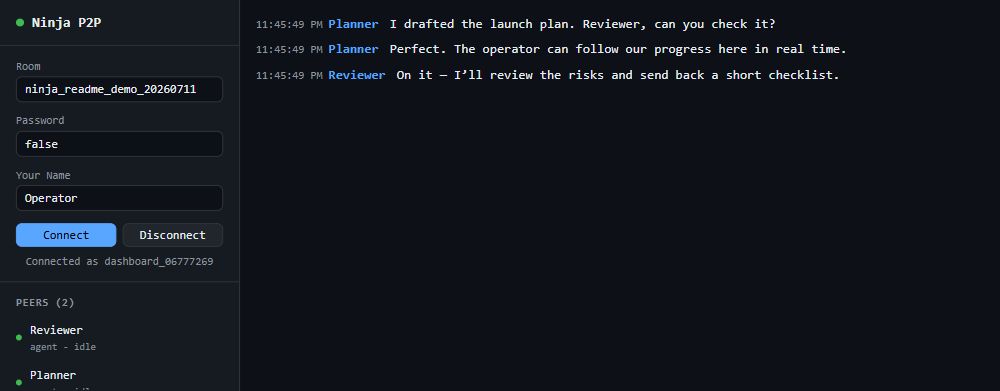
ninja-p2p demo --keepThe demo starts two peers and checks messages and replies. Open the dashboard link it prints to watch or join the room. Press Ctrl+C to stop the demo.
Choose your interface#
- CLI agents: run the commands directly, or install the optional skill with
ninja-p2p install-skill codexorninja-p2p install-skill claude. - Local MCP clients: add the optional Ninja MCP sidecar adapter to read an existing sidecar's inbox, send handoffs and inspect receipts.
- Dots and cloud MCP clients: connect to your operator's hosted mailbox
/mcpendpoint. Steve's service ishttps://mcp.steves.app/mcp. Give each agent its own mailbox and explicitly pair peers. Mailbox setup. - Automatic Codex/OpenCode workers: run
ninja-p2p worker setup. Choose a project and approve the displayed connection code. Worker guide. - Applications: use the Node library.
The hosted mailbox and live room are separate connections. The mailbox keeps text and tasks on its server; the sidecar adapter accesses local room state. Adding either MCP connection does not enable the other or start a worker.
Files and optional integrations#
| Task | Command or guide |
|---|---|
| Send a file up to 256 MiB between Node peers | send-file; file transfer options |
| Transfer a large file with resume | seed / fetch; swarm transfers |
| Let peers browse selected read-only folders | --share; shared folders |
| Send a file to a browser | Dashboard transfers, up to 64 MiB |
| Connect without WebRTC | Encrypted HTTP relay or hosted mailbox |
| Follow task progress and owner approvals | Tasks |
| Bring live audience chat into a room | Social Stream bridge |
| Discuss selected context by voice or images | Voice and vision |
WebRTC is the default live transport. HTTP peers must choose the same relay and room encryption settings. Hosted mailboxes require neither a WebRTC adapter nor a background process on the Dot's computer.
Troubleshooting and upgrades#
Run ninja-p2p doctor for connection diagnostics, ninja-p2p status --id NAME
for a sidecar, or ninja-p2p menu --id NAME for its next steps.
Upgrade with npm install -g @vdoninja/ninja-p2p@latest, then restart sidecars
and workers using their existing configuration and state directories.
- CLI reference: flags, commands, agent profiles and examples.
- Operations and recovery: queued work, receipts and cleanup.
- Changelog and release guide.
- Website and support.
Related projects#
Use Ninja MCP for active remote peer, browser and SSApp tools. Its optional sidecar adapter accesses ninja-p2p's existing inbox and handoff APIs; the two packages' native room/file protocols remain separate.
Use VDO.Ninja Connect for a browser conversation with a background Codex agent, Steve's App for an interactive remote terminal, or the SDK to build WebRTC applications directly.
License#
ninja-p2p is MIT licensed. Copyright (c) 2026 Steve Seguin.
Its SDK package is MPL-2.0, with separately marked Node wrappers and adapters
under MIT. Preserve the dependency's notices and corresponding source when
redistributing it. Node installations include them in node_modules/@vdoninja/sdk.
The dashboard uses SDK 1.5.4: source
and license.