Audio-first by design
Requests audio transport only — video tracks are ignored inside the VST workflow for minimal overhead.
Audio-only WebRTC VST3
 Powered by VDO.Ninja
Stream or monitor live audio directly from your DAW with no local server setup. Purpose-built for low-friction remote collaboration workflows.
Requests audio transport only — video tracks are ignored inside the VST workflow for minimal overhead.
Seed publishes your DAW audio to VDO.Ninja. Play monitors one or more remote streams inside your session.
Receives and decodes audio from multiple peers in a room simultaneously, each with its own Opus decoder, then mixes into stereo output.
High-quality Opus encoding and decoding at 48 kHz with stereo support and automatic sample rate conversion.
Password-based AES encryption for signaling messages, compatible with VDO.Ninja's E2EE protocol.
Join VDO.Ninja rooms with automatic peer discovery, hashed room IDs, and password-protected access.
1
Download the Windows installer or the Mac DMG for your DAW's architecture. On Mac, open the DMG and copy webrtc_vst.vst3 to ~/Library/Audio/Plug-Ins/VST3/.
2
Load the plugin on a track in your DAW (REAPER, Studio One, or any VST3 host). If needed, follow the Getting Started Guide.
3
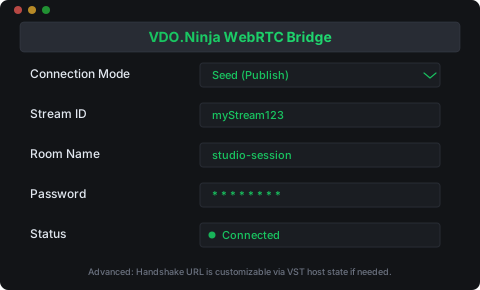
Set mode to Seed to publish audio, or Play to receive a remote stream. Enter a Stream ID and optionally a Room and Password.
Windows (x64), macOS 11+ (Apple Silicon / Intel), Linux (x86-64, Ubuntu 22.04-compatible)
VST3. Logic Pro and GarageBand require Audio Units and are not supported.
REAPER on macOS; REAPER and Studio One on Windows. Other Mac hosts and macOS 11 still need manual validation.
44.1 / 48 / 88.2 / 96 kHz (auto resampled)
This project follows AGPLv3 licensing and a contributor assignment policy aligned with VDO.Ninja.